
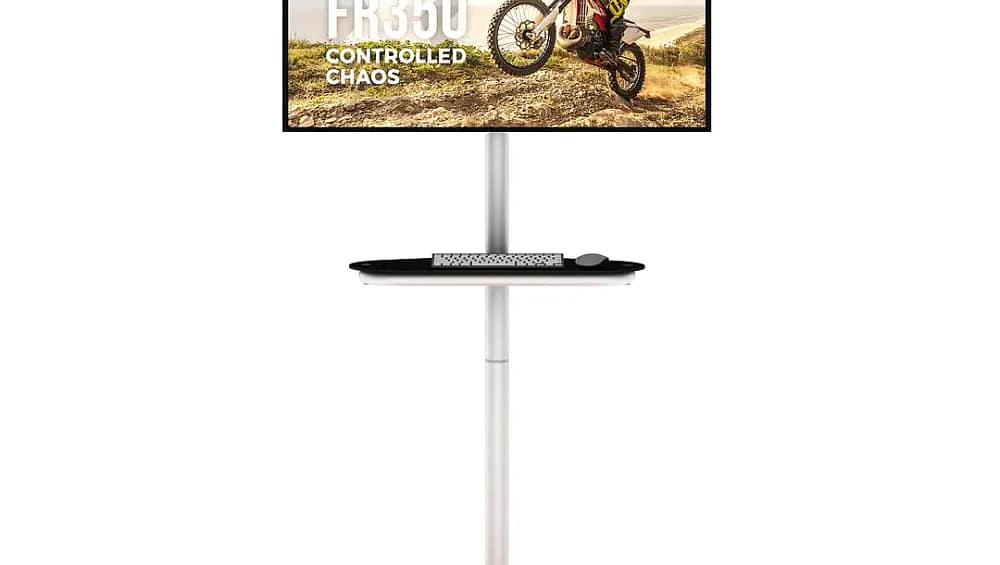
Trade shows and exhibitions across Australia are becoming increasingly digital. From product demonstrations to interactive presentations, businesses are using screens and tablets to engage visitors and communicate their message clearly. Whether you are exhibiting at the International Convention Centre Sydney or the Melbourne Convention and Exhibition Centre, incorporating digital displays can significantly enhance the visitor experience. This is where Monitor & Tablet Stands play an important role. These stands allow exhibitors to securely mount screens and tablets at the right viewing height while maintaining a clean and professional booth layout.
Understanding the Components of Monitor & Tablet Stands
Before beginning assembly, it helps to understand the basic components included with most Monitor & Tablet Stands.
Typically, exhibition stands include a stable base, a vertical support pole or frame, mounting brackets for screens or tablets, and secure fastening hardware. These components are designed to work together to provide stability while keeping your digital display at a comfortable viewing angle for visitors.
Most modern exhibition stands also include adjustable mounts so you can easily change the screen height or orientation depending on your booth layout and presentation needs.
Preparing Your Stand Before Assembly
Setting up your stand starts with preparing the workspace. Exhibition floors can be busy environments, so it is helpful to assemble the stand either before the event or during booth setup hours.
Start by laying out all components on a clean, flat surface. Check that the base plate, support pole, mounting bracket, and screws are included. Many exhibition stands are designed with minimal parts so exhibitors can assemble them quickly without specialised tools.
Having everything organised beforehand ensures that the setup process is smooth and efficient once you begin.
Step 1: Secure the Base for Stability
The first step in assembling Monitor & Tablet Stands is attaching the base. The base provides stability and prevents the stand from tipping when screens or tablets are mounted.
Place the base plate on the floor and attach the vertical support pole according to the manufacturer instructions. Most stands use simple locking mechanisms or bolts that can be tightened easily.
Ensuring the base is properly secured is important because it supports the entire structure of the display stand throughout the exhibition.
Step 2: Attach the Vertical Support Structure
Once the base is in place, the next step is attaching the main support structure. This vertical pole or frame holds the mounting bracket that will support the screen or tablet.
Slide or fasten the pole into the base connection point and tighten the locking mechanism. Many exhibition stands are designed with modular components that click or lock into place quickly.
The vertical support should be firmly secured so it remains stable even when visitors interact with the screen.
Step 3: Install the Monitor or Tablet Mount
After securing the support structure, you can install the mounting bracket for the screen or tablet.
Monitor brackets usually follow universal mounting standards, making them compatible with a wide range of screens. Tablet holders are designed to securely grip devices while still allowing easy access for demonstrations or touch screen interaction.
Attach the bracket to the vertical support pole and tighten the connectors so it stays firmly in position.
Step 4: Mount the Screen or Tablet
The next step is attaching the digital device itself. Carefully place the monitor or tablet onto the mount and secure it using the locking screws or clamps provided.
Many exhibition stands allow you to adjust the angle or orientation of the screen so visitors can view content comfortably from different positions around the booth.
Once mounted, double check that the screen is stable and properly aligned.
Step 5: Organise Cables and Final Adjustments
After mounting the screen or tablet, connect any required power cables, HDMI connections, or charging cords. Many Monitor & Tablet Stands include built in cable management systems that keep wires neatly hidden.
Organising cables helps maintain a clean and professional booth appearance, which is especially important during high profile trade shows and exhibitions.
Finally, adjust the height and viewing angle of the screen to ensure it is easily visible to visitors walking past your booth.
Creating Interactive Exhibition Experiences with Digital Displays
Digital screens and tablets allow exhibitors to showcase product videos, slideshows, live demonstrations, and interactive content that captures attention on busy exhibition floors.
Using Monitor & Tablet Stands ensures these devices are positioned securely and professionally. Instead of holding tablets or placing them on tables, exhibitors can create structured presentation points that encourage visitors to stop and interact.
This simple addition can significantly improve booth engagement and make your display stand out among hundreds of competitors.
Conclusion
Monitor & Tablet Stands provide a practical and professional way to integrate digital displays into exhibition booths. Their simple assembly process allows exhibitors to quickly set up screens that enhance presentations, demonstrations, and visitor engagement.
With stable bases, adjustable mounts, and easy installation, these stands are designed specifically for the fast paced environment of trade shows and exhibitions. They help businesses present digital content clearly while maintaining a clean and organised booth layout.